These instructions apply for Bambu X1E printers
The printer's serial number (SN) is a 15-digit alphanumeric code assigned to each device during manufacturing.
¶ Find the SN
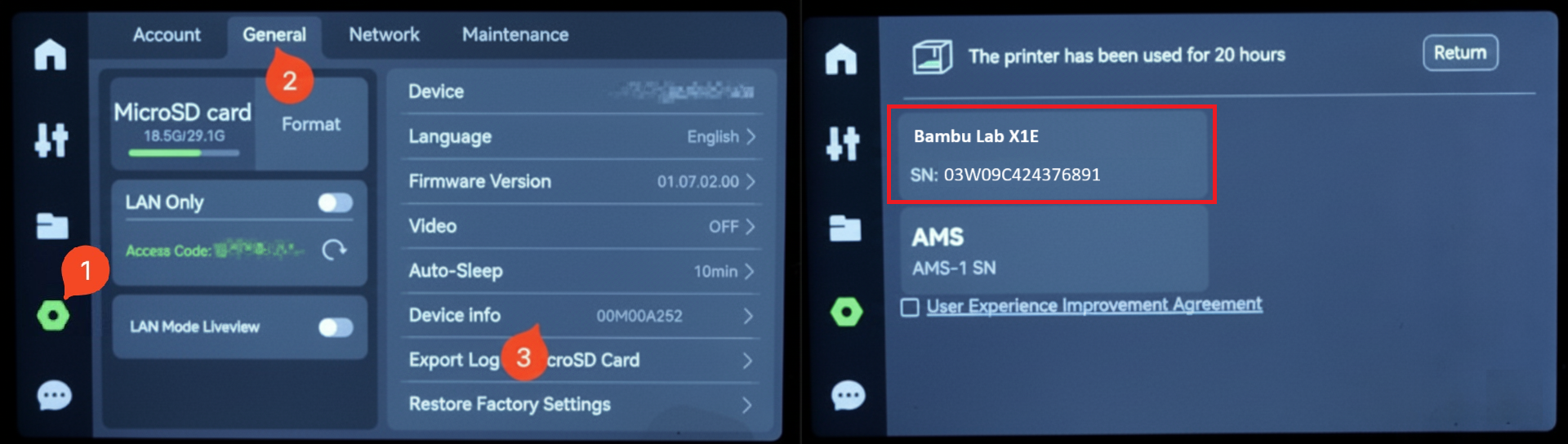
To find the printer name and serial number for Bambu X1E printers, follow the steps below.
- Wake the screen (tap the touchscreen if asleep)
- Tap Settings (the gear/honeycomb/octagon icon on the left).
- Tap on the General tab
- Tap Device Info
- You will see both the printer name and the serial number:
- The printer name is the one above the SN field. In the screenshot below, the printer name is Bambu Lab X1E.
- You will see both the printer name and the serial number:
- The serial number of the X1E starts with "03W".